
The problem
Requests come in through whatever channel is closest. A form, an email, a message in a team channel, a note someone passes on after a call. They arrive half finished, written in different ways, and with very different urgency. Then somebody has to read each one, work out what kind of request it is, decide who owns it, and remember to chase it.
That last part is where small teams lose time. Not because the work is hard, but because nothing about the intake is structured. Two similar requests get handled differently. An incomplete request sits in the queue looking exactly like a complete one. Follow-up depends on someone remembering, and later nobody can say why a case went where it went.
I wanted a small version of this that actually works. One private form, a set of written rules, one record per request, one notification, and a daily check for anything that has stalled.
What it does
A private n8n form is the only way in, so every request arrives in the same shape no matter where it was first mentioned. On submit the workflow cleans the payload, builds a case ID, picks a category, sets a priority and an owner, writes a row to Google Sheets, and posts a card to the Slack channel. A second workflow runs once a day, reads every open case, and sends a reminder when one has stalled.
The path is always the same: capture, classify, route, store, notify, follow up.
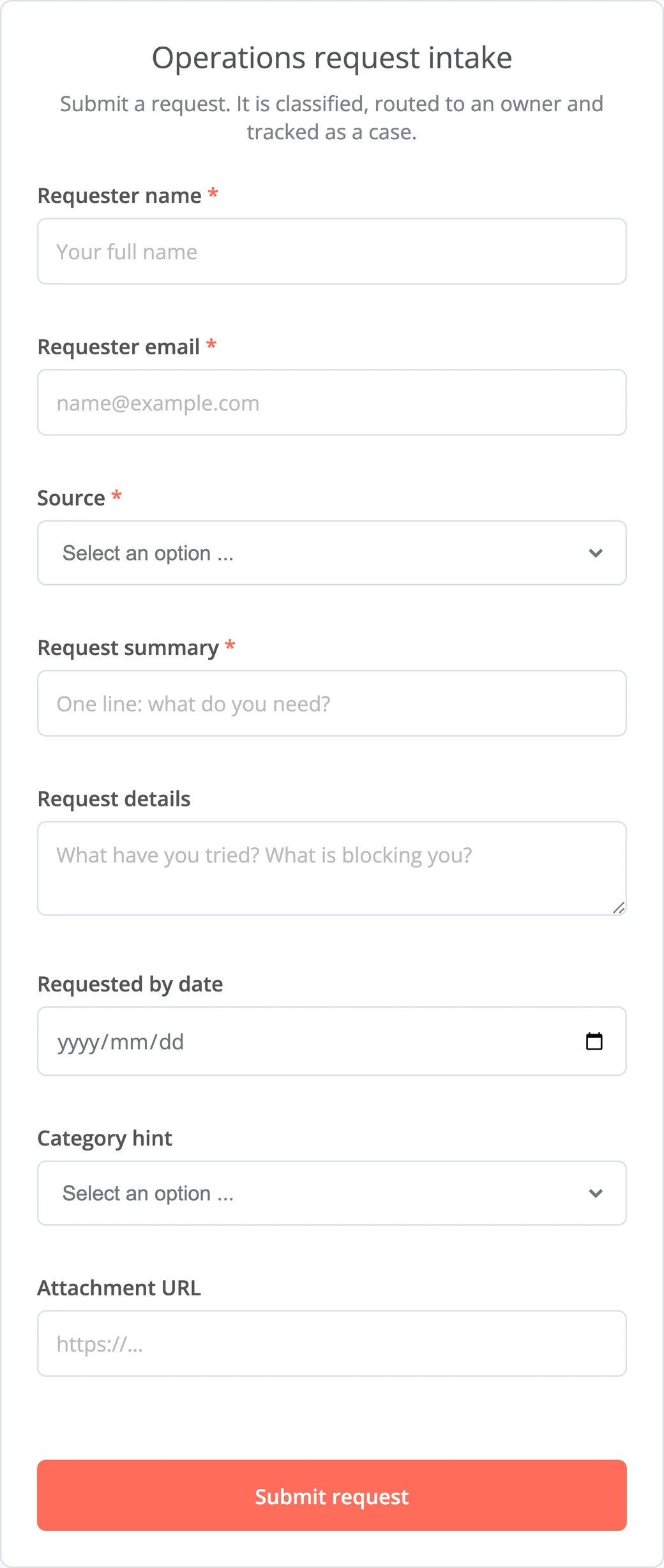
The intake form. Eight fields, four of them required. That was the minimum I needed to classify and route a request. Anything missing gets flagged instead of guessed.
The rules
The classification is not a model. It is rules, so every decision can be read, argued with, and changed by whoever works the queue.
| Category | Matched when | Owner |
|---|---|---|
| Access | hint is Access, or the text contains login, access, permission, account | Ops Access |
| Billing | hint is Billing, or the text contains invoice, payment, refund, charge | Finance Ops |
| Data | hint is Data, or the text contains report, export, import, dashboard, sync | Data Ops |
| Logistics | hint is Logistics, or the text contains delivery, shipment, schedule, address | Operations Coordinator |
| General Ops | nothing matched, so it falls back here | Ops Triage |
| Priority | Set when |
|---|---|
| High | the requested date is today or tomorrow, or the text contains urgent, blocked, escalation, asap |
| Medium | the requested date is within three days, or the category is Access or Data |
| Low | no deadline pressure and no urgency language |
Two rules do most of the work. Priority and completeness are separate fields. An urgent request with no detail stays High, and its status becomes Waiting for Info, so the queue says both things at once instead of choosing one. My first version collapsed the two into a single "Needs Info" priority, which threw away the urgency. And an explicit hint beats a keyword, even across categories: picking Data wins over the word invoice in the description.
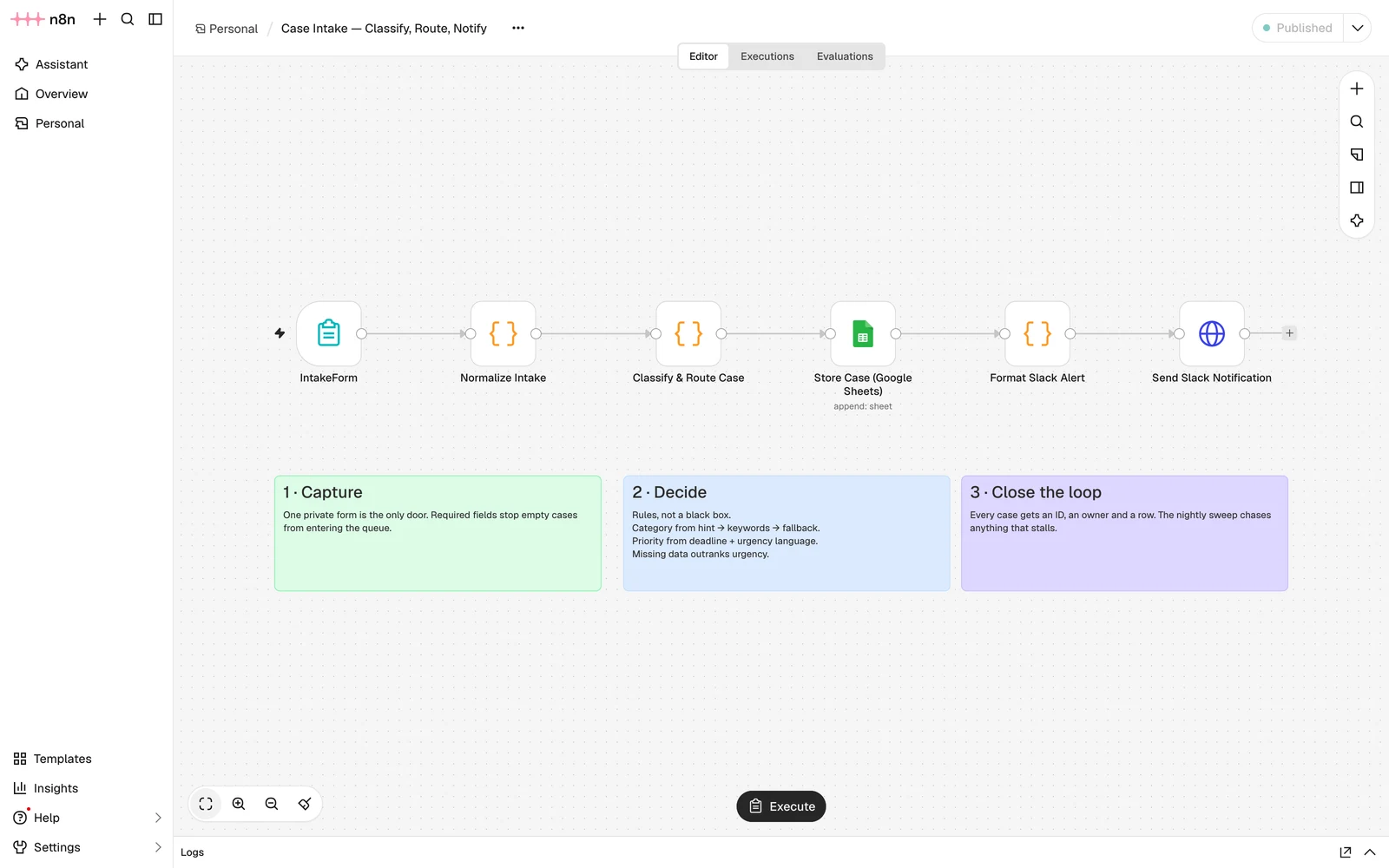
The intake workflow. Form, normalisation, classification, case store, Slack card. The notes on the canvas are the reasoning, kept next to the logic instead of in a document nobody opens.
Proof it behaves
Rules are easy to write and easy to get wrong at the edges, so I ran six submissions through the live form. Five for the shapes the intake is supposed to handle, and one that deliberately mixes signals.
| Test request | Category | Priority | Status | Owner |
|---|---|---|---|---|
| Payroll login blocked before Friday | Access | High | New | Ops Access |
| Duplicate charge on October invoice | Billing | Low | Waiting for Info | Finance Ops |
| Confirm the revised warehouse address | Logistics | Low | New | Operations Coordinator |
| Weekly report needs a dashboard export | Data | Medium | New | Data Ops |
| "Not sure who handles this one" | General Ops | Low | New | Ops Triage |
| ASAP: invoice export is wrong, finance is blocked | Data | High | Waiting for Info | Data Ops |
The second row is the one I care about. A billing complaint with no detail has no deadline and no urgency language, so it is Low, and its status says Waiting for Info. It reaches the owner who has to ask the question, and it does not sit in the queue looking ready.
The last row is the one my first version got wrong. It says invoice, which points at Billing, but the requester picked Data, and the hint wins. It also says ASAP with no detail, so it comes out High and blocked at the same time. That combination is the whole reason priority and status are separate.
This table also caught a real bug. My first version treated "no requested by date" as a very large negative number, so undated requests looked overdue and came out High. Two of the six cases above were wrong until I fixed it.
Timing: across the thirteen runs I recorded, the full execution from submit to Slack post took between 1.5 and 3.8 seconds, median 2.4. Almost all of it is the two API calls, not the classification.
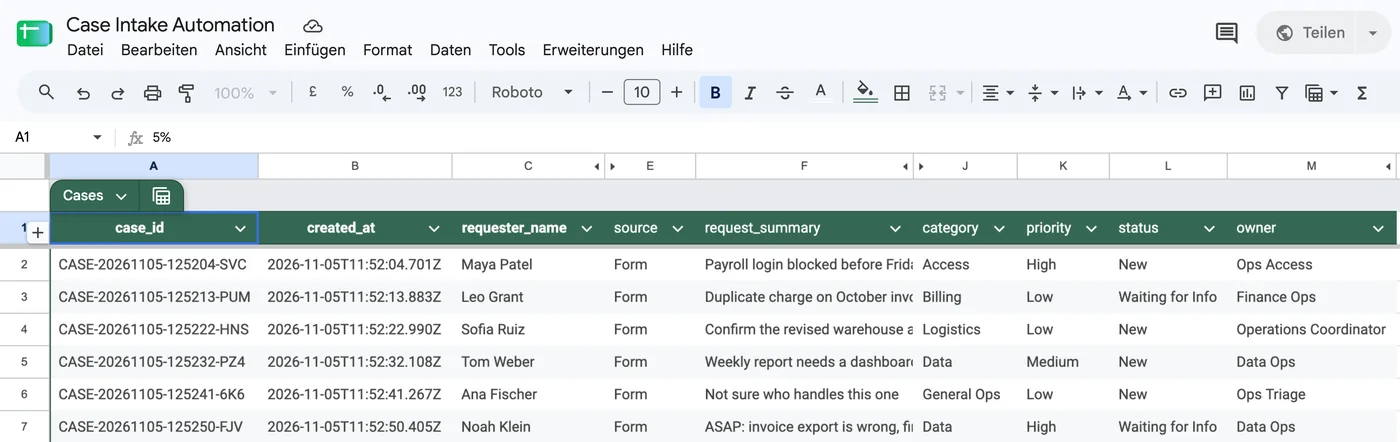
The six cases as stored. The same row the reminder sweep reads the next day, and the same ID that shows up in Slack.
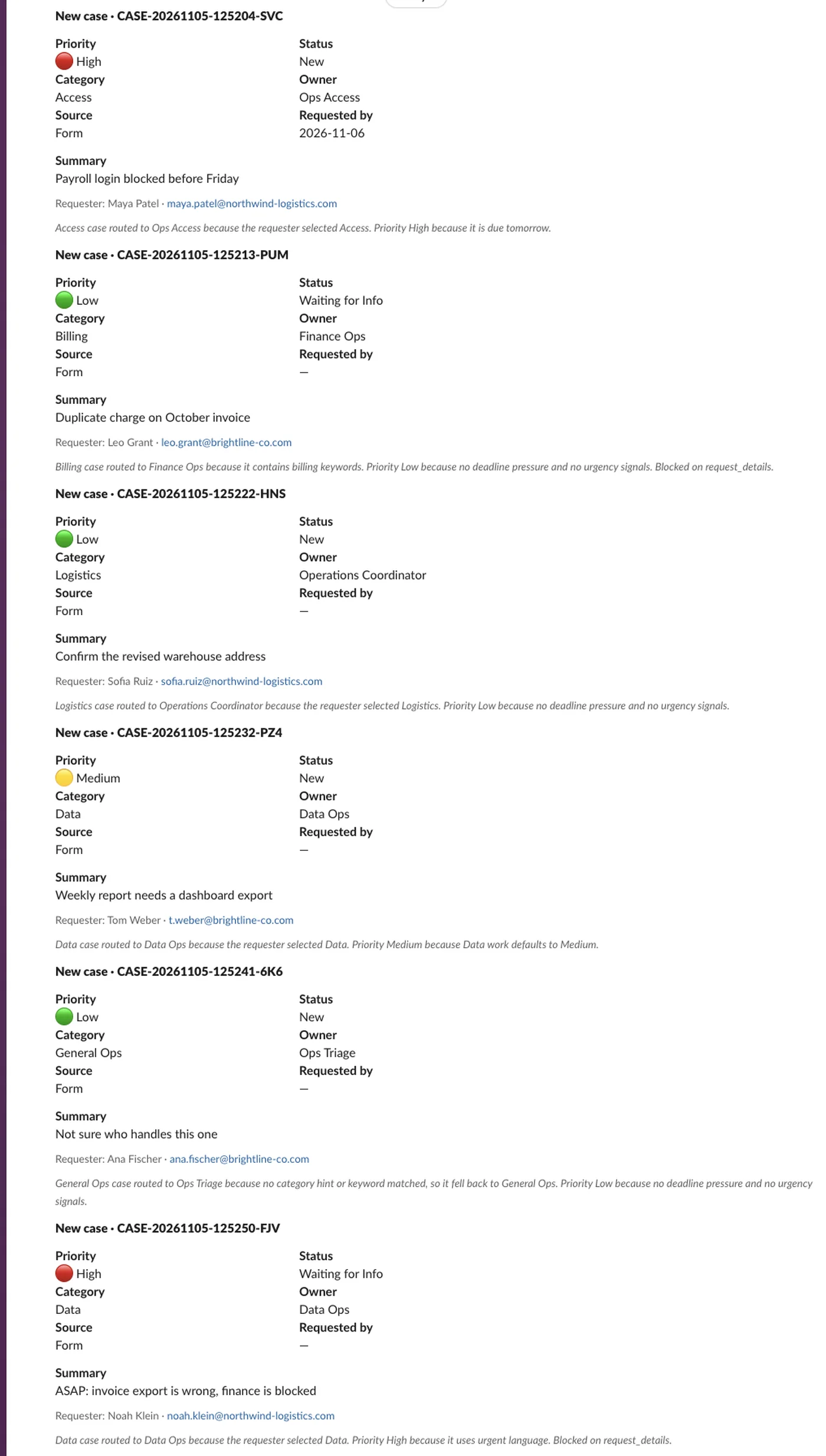
The notification as posted to the shared channel. Owner, priority, status, requester and the routing reason.
The follow-up
A notification is not follow-through. The second workflow runs at 09:00 every day, reads the open cases, and sends a reminder when a case is waiting on the requester, when a High priority case has been open more than a day, or when any case has been open for more than three days.
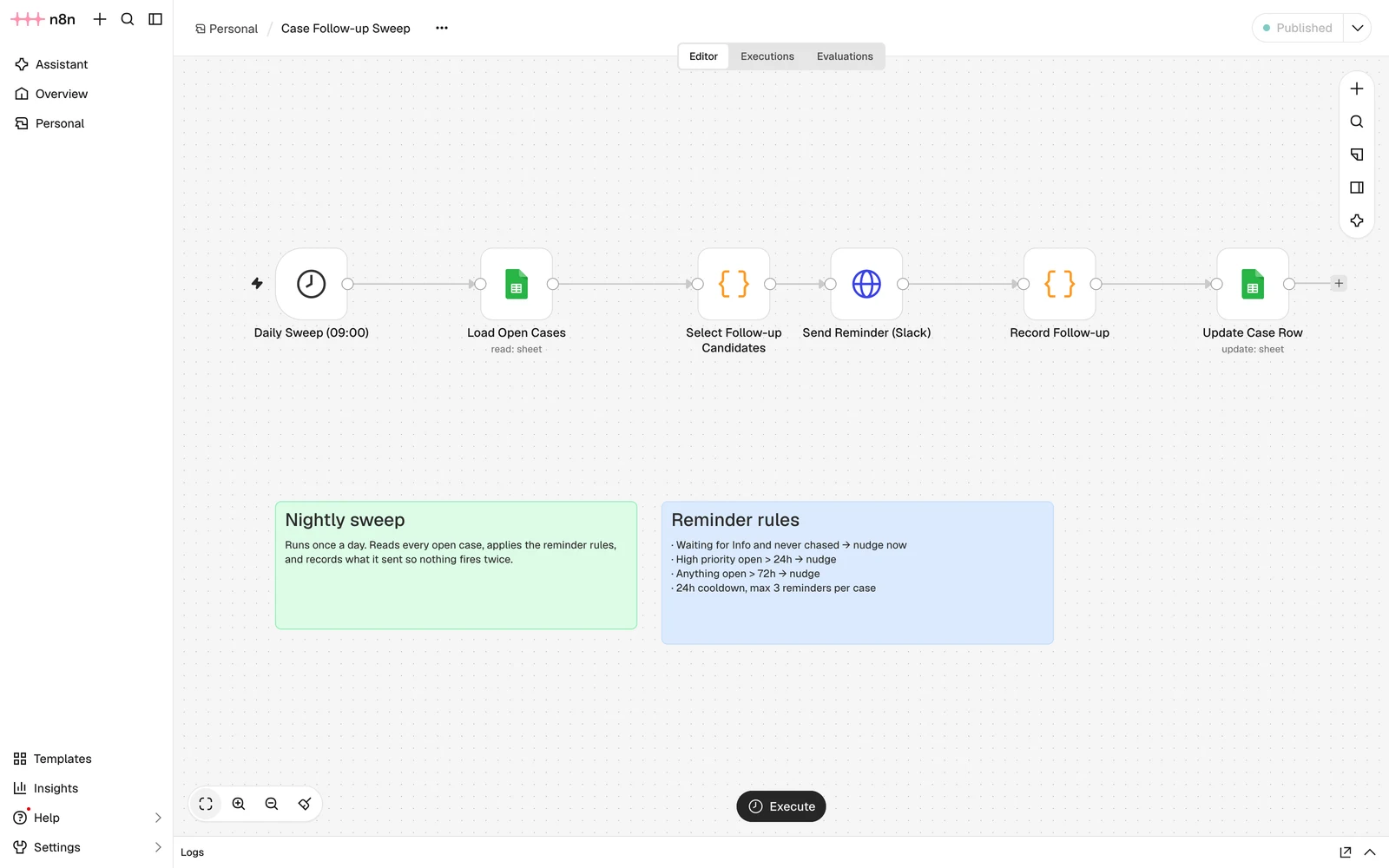
The follow-up sweep. The reminder goes out first, and the record is written only once Slack has accepted it. The third attempt is an escalation, not another nudge.
The record is written after the send, not alongside it. If the Slack request fails, nothing is written to last_follow_up_at or follow_up_count, the cooldown is not set, and the next sweep tries again. Writing both at once would let the sheet count a reminder that never arrived, then wait a day before retrying.
The cooldown came later. The first version had none: it ran hourly and fired on every qualifying case, which came to 46 reminders against one case in under two days. A reminder that fires constantly is the same as no reminder, because people start ignoring the channel.
Decisions and tradeoffs
Google Sheets instead of a database. A case system wants a real database. For a first version though, the sheet is inspectable by the people who work the queue, needs no infrastructure, and shows the state of every case without a UI. The cost is real: no transactions, no permissions beyond the file, and no structured audit log. I would move to Postgres when two people need to update the same case at once, or when someone needs the audit trail to be provable rather than readable.
Rules instead of a language model. A model could handle the ambiguous requests more flexibly. It would also add evaluation and monitoring this demo does not have, and make each decision harder to defend. Rules fail too, but they fail where I can point at them. In operations, "why did this go to Finance?" needs an answer that fits in one sentence.
A private build with a public case study. Exposing a live form means spam, rate limiting, and a public write path into a spreadsheet. None of that improves the part worth showing, which is the design and the evidence.
A cap on reminders. Three attempts, and the third one is not a reminder. It goes to the same channel and the same owner, but the message is an escalation rather than a nudge, and the case is marked Escalated so the sweep stops touching it. Automating the last mile is how you end up with a system that nags instead of one that hands back.
What I would harden for production
Security and governance. Authentication and roles, so a requester cannot see the queue and an owner cannot reassign outside their category. A real audit log with actor and timestamp on every status change, not just the latest row state.
Data and delivery. Retries and idempotency around the sheet write, because a duplicate case ID is worse than a failed write. The same gap exists on the reminder side: if Slack accepts a message and the sheet write then fails, the next sweep sends it again. An outbox with an idempotency key per case and attempt is the usual answer; true exactly-once delivery still needs the receiver to deduplicate as well.
Operations. Status sync from Slack, so closing a case happens where the conversation already is. Validation on the form payload before it reaches the classifier. And alerting on the workflow itself, so a dead credential gets noticed that day instead of the next time someone looks.
What it is not
It is not a case management product, and it does not run in production. It runs on my machine against a shared sheet, with fictional request data. It is a working demo of the loop (capture, decide, route, notify, follow through), small enough to explain in full.